
- Dart Programming - Home
- Dart Programming - Overview
- Dart Programming - Environment
- Dart Programming - Syntax
- Dart Programming - Data Types
- Dart Programming - Variables
- Dart Programming - Operators
- Dart Programming - Loops
- Dart Programming - Decision Making
- Dart Programming - Numbers
- Dart Programming - String
- Dart Programming - Boolean
- Dart Programming - Lists
- Dart Programming - List Operations
- Dart Programming - Map
- Dart Programming - Symbol
- Dart Programming - Runes
- Dart Programming - Enumeration
- Dart Programming - Functions
- Dart Programming - Interfaces
- Dart Programming - Classes
- Dart Programming - Object
- Dart Programming - Collection
- Dart Programming - Generics
- Dart Programming - Packages
- Dart Programming - Exceptions
- Dart Programming - Debugging
- Dart Programming - Typedef
- Dart Programming - Libraries
- Dart Programming - Async
- Dart Programming - Concurrency
- Dart Programming - Unit Testing
- Dart Programming - HTML DOM
Dart Programming Useful Resources
Selected Reading
Dart Programming - if Statement
The if construct evaluates a condition before a block of code is executed.
Syntax
Following is the syntax.
if(boolean_expression){
   // statement(s) will execute if the boolean expression is true.
}
If the Boolean expression evaluates to be true, then the block of code inside the if statement will be executed. If Boolean expression evaluates to be false, then the first set of code after the end of the if statement (after the closing curly brace) will be executed.
The following illustration shows the flowchart of the if statement.
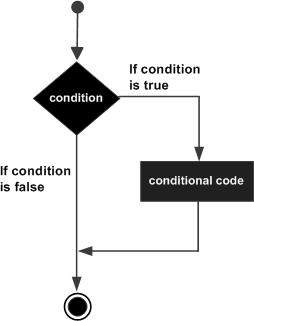
Usage of if Statement
Example
The following example shows how you can use the if statement in Dart.
void main() {
   var  num=5;
   if (num>0) {
      print("number is positive");
   }
}
Output
The above example will print number is positive as the condition specified by the if block is true.
number is positive
dart_programming_decision_making.htm

Advertisements
8