- Cypress - Home
- Cypress - Introduction
- Cypress - Architecture and Environment Setup
- Cypress - Test Runner
- Cypress - Build First Test
- Cypress - Supported Browsers
- Cypress - Basic Commands
- Cypress - Variables
- Cypress - Aliases
- Cypress - Locators
- Cypress - Assertions
- Cypress - Text Verification
- Cypress - Asynchronous Behavior
- Cypress - Working with XHR
- Cypress - jQuery
- Cypress - Checkbox
- Cypress - Tabs
- Cypress - Dropdown
- Cypress - Alerts
- Cypress - Child Windows
- Cypress - Hidden Elements
- Cypress - Frames
- Cypress - Web Tables
- Cypress - Mouse Actions
- Cypress - Cookies
- Cypress - Get and Post
- Cypress - File Upload
- Cypress - Data Driven Testing
- Cypress - Prompt Pop-up Window
- Cypress - Dashboards
- Cypress - Screenshots and Videos
- Cypress - Debugging
- Cypress - Custom Commands
- Cypress - Fixtures
- Cypress - Environment Variables
- Cypress - Hooks
- Cypress - Configuration of JSON File
- Cypress - Reports
- Cypress - Plugins
- Cypress - GitHub
- Cypress Useful Resources
- Cypress - Quick Guide
- Cypress - Useful Resources
- Cypress - Discussion
Cypress - Prompt Pop-up Window
Cypress can handle prompt pop-up windows, where users can input values. A prompt has a text field, where the input is taken. To handle a prompt pop-up, cy.window() method is used.
It obtains the value of the object of the prompt (remote window). In a confirmation/alert pop-up, we have to fire a browser event. But for prompt pop-up, we have to use cy.stub() method.
Example
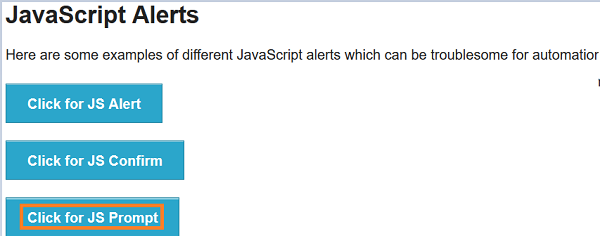
Let us look at the below example, on clicking the Click for JS Prompt button, a prompt pop up gets displayed, as shown below −
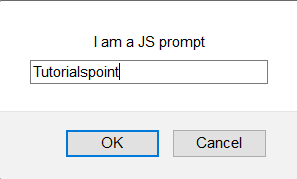
The following prompt with the user input field gets displayed. Tutorialspoint is entered in the prompt pop-up, as shown below.
You entered − Tutorialspoint gets displayed under Result.
This can be seen in the screen displayed below −

Implementation
Given below is an implementation of the commands for displaying prompt pop-up windows in Cypress −
describe('Tutorialspoint Test', function () {
   // test case
   it("Scenario 1", function () {
      //URL launch
      cy.visit("https://the-internet.herokuapp.com/javascript_alerts")
      //handling prompt alert
      cy.window().then(function(p){
         //stubbing prompt window
         cy.stub(p, "prompt").returns("Tutorialspoint");
         // click on Click for JS Prompt button
         cy.get(':nth-child(3) > button').click()
         // verify application message on clicking on OK
         cy.get('#result').contains('You entered: Tutorialspoint')
      });
   });
});
Execution Results
The output is as follows −
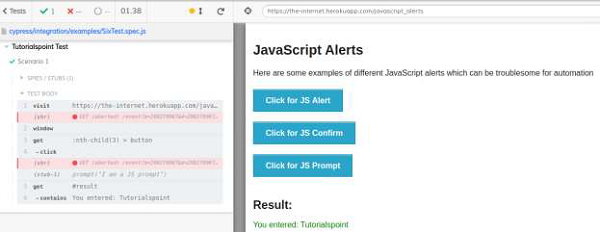
The output logs show the successful verification of the text.
You entered − Tutorialspoint, is produced on clicking OK button on prompt pop up. Also, the stub applied on the prompt window is visible on the output log.