- wxPython - Home
- wxPython - Introduction
- wxPython - Environment
- wxPython - Hello World
- wxPython - GUI Builder Tools
- wxPython - Major Classes
- wxPython - Event Handling
- wxPython - Layout Management
- wxPython - Buttons
- wxPython - Dockable Windows
- Multiple Document Interface
- wxPython - Drawing API
- wxPython - Drag and Drop
- wxPython Resources
- wxPython - Quick Guide
- wxPython - Useful Resources
- wxPython - Discussion
wxPython - StaticBoxSizer
A StaticBoxSizer puts a box sizer into a static box. It provides a border around the box along with a label at the top. Following steps are involved in preparing a statcboxsizer −
Create a wx.StaticBox object.
Declare a wx.StaticBoxSizer with the above static box as its argument.
Create the controls and add in staticbox sizer.
Set it as the sizer for the frame.
Example
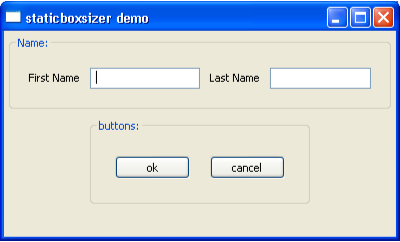
In the following example, two staticbox sizers are created and added into a top vertical box sizer, which controls the layout of the panel inside a frame.
The first staticbox sizer is created around a static box named Name.
nm = wx.StaticBox(panel, -1, 'Name:')
nmSizer = wx.StaticBoxSizer(nm, wx.VERTICAL)
A Horizontal box sizer, holding two labels and two text boxes, is added into nmSizer static box sizer.
nmbox = wx.BoxSizer(wx.HORIZONTAL)

fn = wx.StaticText(panel, -1, "First Name")
nmbox.Add(fn, 0, wx.ALL|wx.CENTER, 5)
nm1 = wx.TextCtrl(panel, -1, style = wx.ALIGN_LEFT)
nm2 = wx.TextCtrl(panel, -1, style = wx.ALIGN_LEFT)
ln = wx.StaticText(panel, -1, "Last Name")

nmbox.Add(nm1, 0, wx.ALL|wx.CENTER, 5)
nmbox.Add(ln, 0, wx.ALL|wx.CENTER, 5)
nmbox.Add(nm2, 0, wx.ALL|wx.CENTER, 5)

nmSizer.Add(nmbox, 0, wx.ALL|wx.CENTER, 10)
Similarly, another staticbox sizer holds a static box named Buttons.
sbox = wx.StaticBox(panel, -1, 'buttons:')
sboxSizer = wx.StaticBoxSizer(sbox, wx.VERTICAL)
Two button objects, named ok and cancel are put in a horizontal box sizer, which in turn, is placed inside the second staticbox sizer.
hbox = wx.BoxSizer(wx.HORIZONTAL)
okButton = wx.Button(panel, -1, 'ok')

hbox.Add(okButton, 0, wx.ALL|wx.LEFT, 10)
cancelButton = wx.Button(panel, -1, 'cancel')

hbox.Add(cancelButton, 0, wx.ALL|wx.LEFT, 10)
sboxSizer.Add(hbox, 0, wx.ALL|wx.LEFT, 10)
Two static box sizers, name and Buttons are added into a vertical box sizer acting as the layout manager of the panel in the top level frame.
panel = wx.Panel(self)
vbox = wx.BoxSizer(wx.VERTICAL)

vbox.Add(nmSizer,0, wx.ALL|wx.CENTER, 5)
vbox.Add(sboxSizer,0, wx.ALL|wx.CENTER, 5)
panel.SetSizer(vbox)
Example
Following is the complete code −
main.py
import wx

class Mywin(wx.Frame):
   def __init__(self, parent, title):
      super(Mywin, self).__init__(parent, title = title)

      panel = wx.Panel(self)
      vbox = wx.BoxSizer(wx.VERTICAL)
      nm = wx.StaticBox(panel, -1, 'Name:')
      nmSizer = wx.StaticBoxSizer(nm, wx.VERTICAL)

      nmbox = wx.BoxSizer(wx.HORIZONTAL)
      fn = wx.StaticText(panel, -1, "First Name")

      nmbox.Add(fn, 0, wx.ALL|wx.CENTER, 5)
      nm1 = wx.TextCtrl(panel, -1, style = wx.ALIGN_LEFT)
      nm2 = wx.TextCtrl(panel, -1, style = wx.ALIGN_LEFT)
      ln = wx.StaticText(panel, -1, "Last Name")

      nmbox.Add(nm1, 0, wx.ALL|wx.CENTER, 5)
      nmbox.Add(ln, 0, wx.ALL|wx.CENTER, 5)
      nmbox.Add(nm2, 0, wx.ALL|wx.CENTER, 5)
      nmSizer.Add(nmbox, 0, wx.ALL|wx.CENTER, 10)

      sbox = wx.StaticBox(panel, -1, 'buttons:')
      sboxSizer = wx.StaticBoxSizer(sbox, wx.VERTICAL)

      hbox = wx.BoxSizer(wx.HORIZONTAL)
      okButton = wx.Button(panel, -1, 'ok')

      hbox.Add(okButton, 0, wx.ALL|wx.LEFT, 10)
      cancelButton = wx.Button(panel, -1, 'cancel')

      hbox.Add(cancelButton, 0, wx.ALL|wx.LEFT, 10)
      sboxSizer.Add(hbox, 0, wx.ALL|wx.LEFT, 10)
      vbox.Add(nmSizer,0, wx.ALL|wx.CENTER, 5)
      vbox.Add(sboxSizer,0, wx.ALL|wx.CENTER, 5)
      panel.SetSizer(vbox)
      self.Centre()

      panel.Fit()
      self.Show()

app = wx.App()
Mywin(None,  'staticboxsizer demo')
app.MainLoop()
Output
The above code produces the following output −