- wxPython - Home
- wxPython - Introduction
- wxPython - Environment
- wxPython - Hello World
- wxPython - GUI Builder Tools
- wxPython - Major Classes
- wxPython - Event Handling
- wxPython - Layout Management
- wxPython - Buttons
- wxPython - Dockable Windows
- Multiple Document Interface
- wxPython - Drawing API
- wxPython - Drag and Drop
- wxPython Resources
- wxPython - Quick Guide
- wxPython - Useful Resources
- wxPython - Discussion
wxPython - Docking Window
wxAui is an Advanced User Interface library incorporated in wxWidgets API. Wx.aui.AuiManager the central class in AUI framework.
AuiManager manages the panes associated with a particular frame using each panels information in wx.aui.AuiPanelInfo object. Let us learn about various properties of PanelInfo object control docking and floating behavior.
Putting dockable windows in the top level frame involves the following steps −
First, create an AuiManager object.
self.mgr = wx.aui.AuiManager(self)
Then, a panel with required controls is designed.
pnl = wx.Panel(self)
pbox = wx.BoxSizer(wx.HORIZONTAL)
text1 = wx.TextCtrl(pnl, -1, "Dockable", style = wx.NO_BORDER | wx.TE_MULTILINE)
pbox.Add(text1, 1, flag = wx.EXPAND)
pnl.SetSizer(pbox)
The following parameters of AuiPanelInfo are set.
Direction − Top, Bottom, Left, Right, or Center
Position − More than one pane can be placed inside a dockable region. Each is given a position number.
Row − More than one pane appears in one row. Just like more than one toolbar appearing in the same row.
Layer − Panes can be placed in layers.
Using this PanelInfo, the designed panel is added into the manager object.
info1 = wx.aui.AuiPaneInfo().Bottom()
self.mgr.AddPane(pnl,info1)
Rest of the top level window may have other controls as usual.
Example
The complete code is as follows −
import wx
import wx.aui

class Mywin(wx.Frame):

   def __init__(self, parent, title):
      super(Mywin, self).__init__(parent, title = title, size = (300,300))

      self.mgr = wx.aui.AuiManager(self)

      pnl = wx.Panel(self)
      pbox = wx.BoxSizer(wx.HORIZONTAL)
      text1 = wx.TextCtrl(pnl, -1, "Dockable", style = wx.NO_BORDER | wx.TE_MULTILINE)
      pbox.Add(text1, 1, flag = wx.EXPAND)
      pnl.SetSizer(pbox)

      info1 = wx.aui.AuiPaneInfo().Bottom()
      self.mgr.AddPane(pnl, info1)
      panel = wx.Panel(self)
      text2 = wx.TextCtrl(panel, size = (300,200), style =  wx.NO_BORDER | wx.TE_MULTILINE)
      box = wx.BoxSizer(wx.HORIZONTAL)
      box.Add(text2, 1, flag = wx.EXPAND)

      panel.SetSizerAndFit(box)
      self.mgr.Update()

      self.Bind(wx.EVT_CLOSE, self.OnClose)
      self.Centre()
      self.Show(True)

   def OnClose(self, event):
      self.mgr.UnInit()
      self.Destroy()

app = wx.App()
Mywin(None,"Dock Demo")
app.MainLoop()
Output
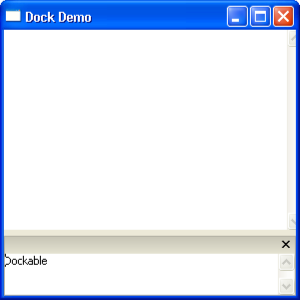
The above code produces the following output −