
- Basic Image Operations
- Python Pillow - Working with Images
- Python Pillow - Resizing an Image
- Python Pillow - Flip and Rotate Images
- Python Pillow - Cropping an Image
- Python Pillow - Adding Borders to Images
- Python Pillow - Identifying Image Files
- Python Pillow - Merging Images
- Python Pillow - Cutting and Pasting Images
- Python Pillow - Rolling an Image
- Python Pillow - Writing text on image
- Python Pillow - ImageDraw Module
- Python Pillow - Concatenating two Images
- Python Pillow - Creating Thumbnails
- Python Pillow - Creating a Watermark
- Python Pillow - Image Sequences
- Python Pillow Color Conversions
- Python Pillow - Colors on an Image
- Python Pillow - Creating Images With Colors
- Python Pillow - Converting Color String to RGB Color Values
- Python Pillow - Converting Color String to Grayscale Values
- Python Pillow - Change the Color by Changing the Pixel Values
- Image Manipulation
- Python Pillow - Reducing Noise
- Python Pillow - Changing Image Modes
- Python Pillow - Compositing Images
- Python Pillow - Working with Alpha Channels
- Python Pillow - Applying Perspective Transforms
- Image Filtering
- Python Pillow - Adding Filters to an Image
- Python Pillow - Convolution Filters
- Python Pillow - Blur an Image
- Python Pillow - Edge Detection
- Python Pillow - Embossing Images
- Python Pillow - Enhancing Edges
- Python Pillow - Unsharp Mask Filter
- Image Enhancement and Correction
- Python Pillow - Enhancing Contrast
- Python Pillow - Enhancing Sharpness
- Python Pillow - Enhancing Color
- Python Pillow - Correcting Color Balance
- Python Pillow - Removing Noise
- Advanced Topics
- Python Pillow - Creating Animated GIFs
- Python Pillow - Batch Processing Images
- Python Pillow - Converting Image File Formats
- Python Pillow - Adding Padding to an Image
- Python Pillow - Color Inversion
- Python Pillow - M L with Numpy
- Python Pillow with Tkinter BitmapImage and PhotoImage objects
- Image Module
- Python Pillow - Image Blending
- Python Pillow Useful Resources
- Python Pillow - Quick Guide
- Python Pillow - Function Reference
- Python Pillow - Useful Resources
- Python Pillow - Discussion
Python Pillow - Removing Noise
Removing noise, also referred to as denoising, involves the process of reducing unwanted artifacts in an image. Noise in an image typically appears as random variations in brightness or color that are not part of the original scene or subject being photographed. The goal of image denoising is to enhance the quality of an image by eliminating or reducing these unwanted and distracting artifacts, making the image cleaner, and more visually appealing.
The Python pillow library offers a range of denoising filters, allowing users to remove noise from noisy images and recover the original image. In this tutorial, we will explore GaussianBlur and Median filters as effective methods for noise removal.
Removing the noise using the GaussianBlur filter
Removing the noise from an image using the gaussian blur filter is a widely used technique. This technique is works by applying a convolution filter to the image to smooth out the pixel values.
Example - Using Gaussian Blur Filter
Here is an example that uses the ImageFilter.GaussianBlur() filter to remove the noise from an RGB image.
main.py
from PIL import Image, ImageFilter

# Open a Gaussian Noised Image
input_image = Image.open("Images/GaussianNoisedImage.jpg").convert('RGB')

# Apply Gaussian blur with some radius
blurred_image = input_image.filter(ImageFilter.GaussianBlur(radius=2))

# Display the input and the blurred image
input_image.show()
blurred_image.show()
Input Noised Image

Output Noise Removed Image

Example - Removing the noise using the Median Filter
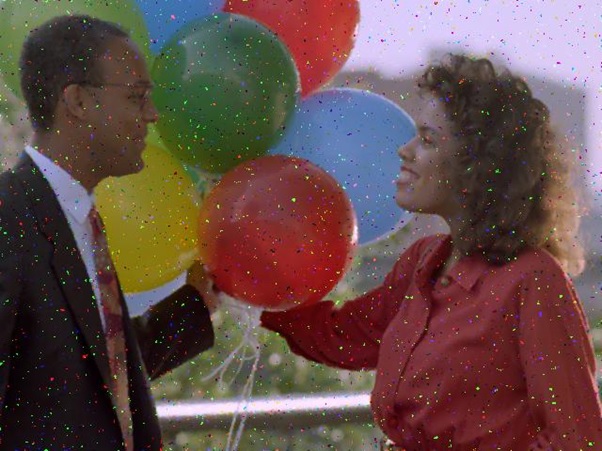
The median filter is an alternative approach for noise reduction, particularly useful for the images where the noise points are like small and scattered. This function operates by replacing each pixel value with the median value within its local neighborhood. the Pillow library provides the ImageFilter.MedianFilter() filter for this purpose.
Following example removes the noice from an image using the ImageFilter.MedianFilter().
main.py
from PIL import Image, ImageFilter

# Open an image
input_image = Image.open("Images/balloons_noisy.jpg")

# Apply median filter with a kernel size
filtered_image = input_image.filter(ImageFilter.MedianFilter(size=3))

# Display the input and the filtered image
input_image.show()
filtered_image.show()
Input Noisy Image

Output Median Filtered Image
Exampl - Reducing Noise in Grayscale Image
This example demonstrates the reduction of salt-and-pepper noise in a grayscale image. This can be done by using a median filter, enhancing the contrast to improve visibility, and subsequently converting the image to binary mode for display.
main.py
from PIL import Image, ImageEnhance, ImageFilter, ImageOps

# Open the image and convert it to grayscale
input_image = ImageOps.grayscale(Image.open('Images/salt-and-pepper_noise.jpg'))

# Apply a median filter with a kernel size of 5 to reduce noise
filtered_image = input_image.filter(ImageFilter.MedianFilter(5))

# Enhance the contrast of the filtered image
contrast_enhancer = ImageEnhance.Contrast(filtered_image)
high_contrast_image = contrast_enhancer.enhance(3)

# Convert the image to binary
binary_image = high_contrast_image.convert('1')

# Display the input and processed images
input_image.show()
binary_image.show()
Input Noisy Image

Output Median Filtered Image