
- Python Web - Django Framework
- Django Framework - Overview
- Django Framework - Users
- Django Framework - Installation
- Django Framework - Creating Application
- Python Web - Flask Framework
- Python Web - Flask Framework
- Flask Framework - Creating URL Routing
- Flask Framework - Using Templates
- Python Web - Pyramid Framework
- Python Web - Pyramid Framework
- Pyramid Framework - Core Concepts
- Pyramid Framework - Creating Application
- Python Web - Dash Framework
- Python Web - Dash Framework
- Dash Framework - App Layout
- Dash Framework - HTML Component
- Dash Framework - Visualization
- Python Web - py4web Framework
- Python Web - py4Web Framework
- py4web Framework - Dashboard
- py4web Framework - Creating Application
- Python Web - Miscellaneous
- Python Web - Web2py Framework
- Python Web - Choosing a Better Framework
- Python Web Development Libraries Resources
- Python Web - Quick Guide
- Python Web - Useful Resources
- Python Web - Discussion
Dash Framework - App Layout
In order to make sure everything is working properly, here, we created a simple dashApp.py file.
Dash or App Layout
Dash apps are composed of two parts. The first part is the layout of the app which basically describes how the application looks like. The second part describes the interactivity of the application.
Core Components
We can build the layout with the html and the dcc library. Dash provides python classes for all the visual components of the application. We can also customize our own components with JavaScript and React.js.
from dash import dcc
from dash import html
The html is for all HTML tags where the dcc is for interactivity built with React.js.
Using above two libraries, let us write a code as given below −
app = dash.Dash()
app.layout = html.Div(children=[
   html.H1(children='Hello Dash'),
   html.Div(children='''Dash Framework: A web application framework for Python.''')
And the equivalent HTML code would look like this −
<div>
   <h1> Hello Dash </h1>
   <div> Dash Framework: A web application framework for Python. </div>
</div>
Writing Simple Dash app
We will learn how to write a simple example on dash using above mentioned library in a file dashApp.py.
dashApp.py
import dash
from dash import dcc
from dash import html

app = dash.Dash()
app.layout = html.Div(children=[
   html.H1(children='Hello Dash'),
   html.Div(children='''Dash Framework: A web application framework for Python.'''),

   dcc.Graph(
      id='example-graph',
      figure={
         'data': [
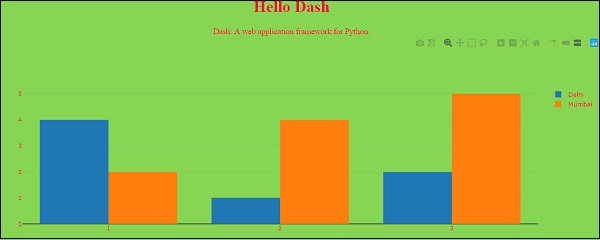
            {'x': [1, 2, 3], 'y': [4, 1, 2], 'type': 'bar', 'name': 'Delhi'},
            {'x': [1, 2, 3], 'y': [2, 4, 5], 'type': 'bar', 'name': u'Mumbai'},
         ],
         'layout': {
            'title': 'Dash Data Visualization'
         }
      }
   )
])

if __name__ == '__main__':
   app.run_server(debug=True)
Running the Dash app
Note the following points while running the Dash app.
(MyDjangoEnv) C:\Users\rajesh\Desktop\MyDjango\dash>py dashApp1.py

Dash is running on http://127.0.0.1:8050/

 * Serving Flask app 'main'
 * Debug mode: on
Output
Visit http:127.0.0.1:8050/ in your web browser. You should see an app that looks like this.
In above program, few important points to be noted are as follows −
The app layout is composed of a tree of components like html.Div and dcc.Graph.
The dash_html_components library has a component for every HTML tag. The html.H1 (children = Hello Dash) component generates a <h1> Hello Dash </h1> HTML element in your application.
Not all components are pure HTML. The dash_core_components describe higher-level components that are interactive and are generated with JavaScript, HTML, and CSS through the React.js library.
Each component is described entirely through keyword attributes. Dash is declarative: you will primarily describe your application through these attributes.
The children property is special. By convention, its always the first attribute which means that you can omit it.
Html.H1 (children=Hello Dash) is the same as html.H1 (Hello Dash).
The fonts in your application will look a little bit different than what is displayed here. This application is using a custom CSS stylesheet to modify the default styles of the elements. Custom font style is permissible, but as of now, we can add the below URL or any URL of your choice −
app.css.append_css ({external_url:https://codepen.io/chriddyp/pen/bwLwgP.css}) to get your file to get the same look and feel of these examples.
