
- Python Web - Django Framework
- Django Framework - Overview
- Django Framework - Users
- Django Framework - Installation
- Django Framework - Creating Application
- Python Web - Flask Framework
- Python Web - Flask Framework
- Flask Framework - Creating URL Routing
- Flask Framework - Using Templates
- Python Web - Pyramid Framework
- Python Web - Pyramid Framework
- Pyramid Framework - Core Concepts
- Pyramid Framework - Creating Application
- Python Web - Dash Framework
- Python Web - Dash Framework
- Dash Framework - App Layout
- Dash Framework - HTML Component
- Dash Framework - Visualization
- Python Web - py4web Framework
- Python Web - py4Web Framework
- py4web Framework - Dashboard
- py4web Framework - Creating Application
- Python Web - Miscellaneous
- Python Web - Web2py Framework
- Python Web - Choosing a Better Framework
- Python Web Development Libraries Resources
- Python Web - Quick Guide
- Python Web - Useful Resources
- Python Web - Discussion
Python Web - Pyramid Framework
Pyramid is a general, open source, web application development framework built in python. It allows python developer to create web applications with ease.
Pyramid is backed by the enterprise knowledge Management System KARL (a George Soros project).Installing, starting up and configuring
As described, the start small, finish big, stay finished framework, Pyramid is much like Flask which takes very little effort to install and run. In fact, youll recognize that some of the patterns are similar to Flask once you start building this application.
Following are the steps to create pyramid framework environment −
First, create a project directory. Here, we have created a directory named pyramidProject (you can choose any name you want).
Next, create a virtual environment where you will install all the project specific dependencies. Here, we created a virtual environment folder named pyramidEnv where Pyramid is installed.
Then, go to the directory, pyramidEnv and install the pyramid with pip3 install pyramid.
Once everything is done as mentioned above, your directory structure will be as shown below −
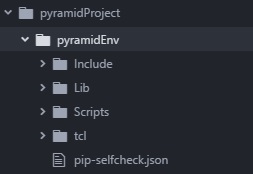
And the pyramid version installed in the system is given below −
>>> import pkg_resources
>>> print(pkg_resources.get_distribution("pyramid").version)
2.0.2
>>>
