- Python Web - Django Framework
- Django Framework - Overview
- Django Framework - Users
- Django Framework - Installation
- Django Framework - Creating Application
- Python Web - Flask Framework
- Python Web - Flask Framework
- Flask Framework - Creating URL Routing
- Flask Framework - Using Templates
- Python Web - Pyramid Framework
- Python Web - Pyramid Framework
- Pyramid Framework - Core Concepts
- Pyramid Framework - Creating Application
- Python Web - Dash Framework
- Python Web - Dash Framework
- Dash Framework - App Layout
- Dash Framework - HTML Component
- Dash Framework - Visualization
- Python Web - py4web Framework
- Python Web - py4Web Framework
- py4web Framework - Dashboard
- py4web Framework - Creating Application
- Python Web - Miscellaneous
- Python Web - Web2py Framework
- Python Web - Choosing a Better Framework
- Python Web Development Libraries Resources
- Python Web - Quick Guide
- Python Web - Useful Resources
- Python Web - Discussion
Dash Framework - HTML Components
The html library contains a component class for every HTML tag as well as keyword arguments for all of the HTML arguments.
Let us add the inline style of the components in our previous app text −
main.py
import dash
from dash import dcc
from dash import html

app = dash.Dash()
colors = {
   'background': '#87D653',
   'text': '#ff0033'
}

app.layout = html.Div(style={'backgroundColor': colors['background']}, children=[
   html.H1(
      children='Hello Dash',
      style={
         'textAlign': 'center',
         'color': colors['text']
      }
   ),

   html.Div(children='Dash: A web application framework for Python.', style={
      'textAlign': 'center',
      'color': colors['text']
   }),

   dcc.Graph(
      id='example-graph-2',

      figure={
         'data': [
            {'x': [1, 2, 3], 'y': [4, 1, 2], 'type': 'bar', 'name': 'Delhi'},
            {'x': [1, 2, 3], 'y': [2, 4, 5], 'type': 'bar', 'name': u'Mumbai'},
         ],
         'layout': {
            'plot_bgcolor': colors['background'],
            'paper_bgcolor': colors['background'],
            'font': {
               'color': colors['text']
            }
         }
      }
   )
])

if __name__ == '__main__':
   app.run(debug=True)
Output
In the above example, we modified the inline styles of the html.Div and html.H1 components with the style property.

It is rendered in the Dash application as follows −

There are couple of key distinctions between html library components and HTML attributes −
For style property in Dash, you can just supply a dictionary, whereas in HTML, it is semicolon-separated string.
Style dictionary keys are camelCased, so text-align changes to textalign.
ClassName in Dash is similar to HTML class attribute.
The first argument is the children of the HTML tag which is specified through the children keyword argument.
Reusable Components
By writing our markup in Python, we can create complex reusable components like tables without switching contexts or languages −
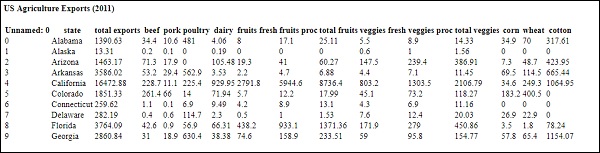
Below is a quick example that generates a Table from pandas dataframe.
main.py
import dash
from dash import dcc
from dash import html
import pandas as pd

df = pd.read_csv(
   'https://gist.githubusercontent.com/chriddyp/'
   'c78bf172206ce24f77d6363a2d754b59/raw/'
   'c353e8ef842413cae56ae3920b8fd78468aa4cb2/'
   'usa-agricultural-exports-2011.csv')

def generate_table(dataframe, max_rows=10):
   return html.Table(
      # Header
      [html.Tr([html.Th(col) for col in dataframe.columns])] +
      # Body
      [html.Tr([
         html.Td(dataframe.iloc[i][col]) for col in dataframe.columns
      ]) for i in range(min(len(dataframe), max_rows))]
   )

app = dash.Dash()
app.layout = html.Div(children=[
   html.H4(children='US Agriculture Exports (2011)'),
   generate_table(df)
])

if __name__ == '__main__':
   app.run(debug=True)
Output
Our output will be something like −