
- Python Web - Django Framework
- Django Framework - Overview
- Django Framework - Users
- Django Framework - Installation
- Django Framework - Creating Application
- Python Web - Flask Framework
- Python Web - Flask Framework
- Flask Framework - Creating URL Routing
- Flask Framework - Using Templates
- Python Web - Pyramid Framework
- Python Web - Pyramid Framework
- Pyramid Framework - Core Concepts
- Pyramid Framework - Creating Application
- Python Web - Dash Framework
- Python Web - Dash Framework
- Dash Framework - App Layout
- Dash Framework - HTML Component
- Dash Framework - Visualization
- Python Web - py4web Framework
- Python Web - py4Web Framework
- py4web Framework - Dashboard
- py4web Framework - Creating Application
- Python Web - Miscellaneous
- Python Web - Web2py Framework
- Python Web - Choosing a Better Framework
- Python Web Development Libraries Resources
- Python Web - Quick Guide
- Python Web - Useful Resources
- Python Web - Discussion
py4Web Framework - Creating Application
We can create a py4web application easily using Dashboard −
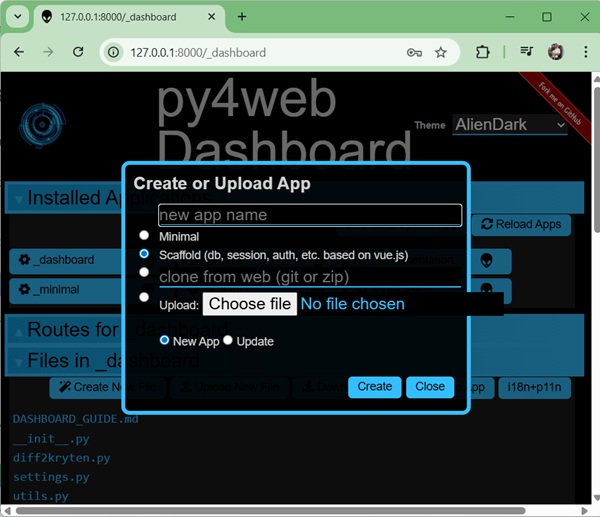
Dashboard provides following options −
Minimal − a simple minimalistic pyweb application.
Scaffold − more advance application with support for database, session, authentication etc. using vue.js
Clone − from github repository as a .git or .zip file
Upload − from local machine, as a .zip file to create an application using existing application.
Creating Application using Command Line
An App is a python module, so we can simply create a folder under apps directory and place an optional __init__.py file.
(myenv) D:\Projects\python\myenv\apps>mkdir firstApp

(myenv) D:\Projects\python\myenv\apps>echo '' > __init__.py

(myenv) D:\Projects\python\myenv\apps>cd firstapp

(myenv) D:\Projects\python\myenv\apps\firstApp>dir
 Volume in drive D is New Volume
 Volume Serial Number is B8D7-1C9E

 Directory of D:\Projects\python\myenv\apps\firstApp

13-03-2026  14:41    <DIR>          .
13-03-2026  14:41    <DIR>          ..
               0 File(s)              0 bytes
               2 Dir(s)  176,391,516,160 bytes free

(myenv) D:\Projects\python\myenv\apps\firstApp>
Now if you run the py4web using py4web run apps command, you can check the firstApp application under dashboard.
(myenv) D:\Projects\python\myenv>py4web run apps
...
Output
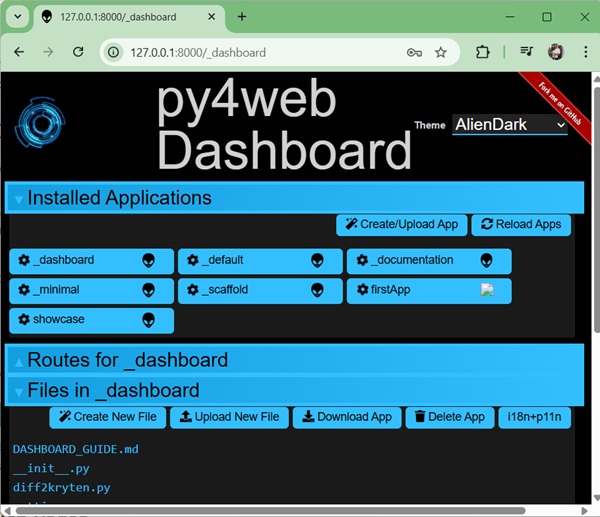
Open dashboard and verify the firstApp is listed.
Adding static pages
To add static pages, simply create a static folder under the application folder, in our case, firstApp. Any page created under static directory is automatically published.
(myenv) D:\Projects\python\myenv>cd apps

(myenv) D:\Projects\python\myenv\apps>cd firstApp

(myenv) D:\Projects\python\myenv\apps\firstApp>mkdir static

(myenv) D:\Projects\python\myenv\apps\firstApp>echo 'Hello World' > static/hello.txt
Output
Open http://localhost:8000/firstApp/static/hello.txt and verify the output −.
Hello World
Adding dynamic pages
To add dynamic page, we need to create a python file which returns a string. For example, edit the __init__.py file.
from py4web import action

@action('index')
def page():
    return "Hello World"
Output
Open http://localhost:8000/firstApp and verify the output −.
Hello World
